.animate(): Thực hiện một hình ảnh động (animate) tùy chỉnh của một tập hợp các thuộc tính css.
animate(Thuộc tính,Tốc độ,'easing',function(){})
Thuộc tính:
- backgroundPositionX (VD: backgroundPositionX:”+=100px”)
- backgroundPositionY (VD: backgroundPositionY:”+=100px”)
- borderWidth (VD: borderWidth:”10px”)
- borderBottomWidth (VD: borderBottomWidth:”10px”)
- borderLeftWidth (VD: borderLeftWidth:”10px”)
- borderRightWidth (VD: borderRightWidth:”10px”)
- borderTopWidth (VD: borderTopWidth:”10px”)
- borderSpacing (VD: borderSpacing:”10px”)
- margin (VD: margin:”+=100px”)
- marginBottom (VD: marginBottom:”+=100px”)
- marginLeft (VD: marginLeft:”+=100px”)
- marginRight (VD: marginRight:”+=100px”)
- marginTop (VD: marginTop:”+=100px”)
- opacity (VD: opacity:0.25)
- outlineWidth (VD: outlineWidth:”10px”)
- padding (VD: padding:”+=100px”)
- paddingBottom (VD: paddingBottom:”+=100px”)
- paddingLeft (VD: paddingLeft:”+=100px”)
- paddingRight (VD: paddingRight:”+=100px”)
- paddingTop (VD: paddingTop:”+=100px”)
- height (VD: height:”+=100px”)
- width (VD: width:”+=100px”)
- maxHeight (VD: maxHeight:”+=100px”)
- maxWidth (VD: maxWidth:”+=100px”)
- minHeight (VD: minHeight:”+=100px”)
- minWidth (VD: minWidth:”+=100px”)
- fontSize (VD: fontSize:”1em”)
- bottom (VD: bottom:”+=100px”)
- left (VD: left:”+=100px”)
- right (VD: right:”+=100px”)
- top (VD: top:”+=100px”)
- letterSpacing (VD: letterSpacing:”+=10px”)
- wordSpacing (VD: wordSpacing:”+=10px”)
- lineHeight (VD: lineHeight:”+=10px”)
- textIndent (VD: textIndent:”10px”)
Tốc độ có thể bằng số hoặc bằng chữ: slow, fast (mặc đinh 400).
Easing có thể sử dụng swing hoặc linear (mặc định swing).
.animate(Thuộc tính,options)
Các giá trị của options:
- duration có thể bằng số hoặc bằng chữ: slow, fast.
- Easing có thể sử dụng swing hoặc linear (mặc định swing).
- queue: có giá trị true hay false, xác có hay không trong việc đặt các animate trong hàng đợi hiệu ứng, nếu giá trị false animate sẽ hoạt động ngay lập tức.
- specialEasing: một bản đồ (map) của một hoặc nhiều thuộc tính css định nghĩa bởi đối số và hàm easing tương ứng (được thêm vào phiên bản 1.4).
- step: quy định cụ thể chức năng được thực hiện sau mỗi bước trong các hình ảnh động.
- progress: một chức năng được gọi sau mỗi bước của các hình ảnh động, chỉ một lần cho mỗi phần tử không phụ thuộc vào số thuộc tính animate.
- complete: một chức năng được gọi sau khi hoàn thành animate.
- done: một chức năng được gọi sau khi hoàn thành animate (đối tượng Promise được giải quyết).
- fail: một chức năng được gọi sau khi không hoàn thành animate (đối tượng Promise được loại bỏ).
- always: một chức năng được gọi sau khi animate hoàn thành hoặc dừng lại (đối tường Promise được giải quyết hoặc loại bỏ).
Ví dụ:
<!doctype html>
<html lang="en">
<head>
<meta charset="utf-8">
<title>animate demo</title>
<style>
div {
background-color: #bca;
width: 100px;
border: 1px solid green;
}
</style>
<script src="https://code.jquery.com/jquery-1.10.2.js"></script>
</head>
<body>
<button id="go">» Run</button>
<div id="block">Hello!</div>
<script>
// Using multiple unit types within one animation.
$( "#go" ).click(function() {
$( "#block" ).animate({
width: "70%",
opacity: 0.4,
marginLeft: "0.6in",
fontSize: "3em",
borderWidth: "10px"
}, 1500 );
});
</script>
</body>
</html>Ví dụ 2:
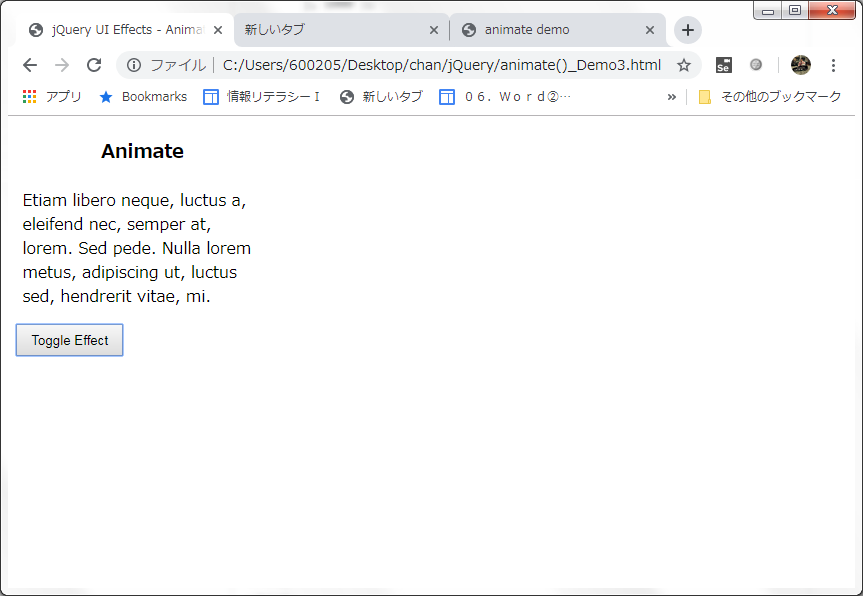
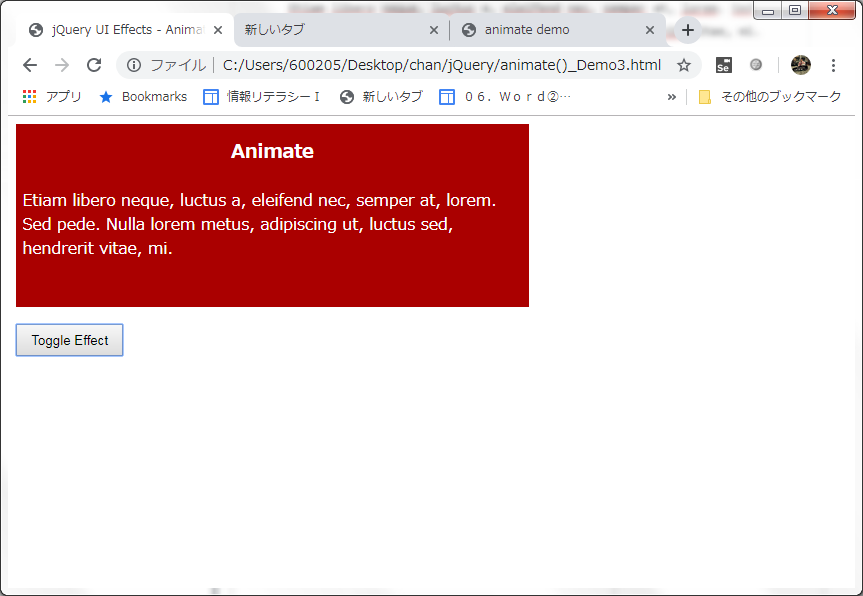
<!doctype html>
<html lang="en">
<head>
  <meta charset="utf-8">
  <meta name="viewport" content="width=device-width, initial-scale=1">
  <title>jQuery UI Effects - Animate demo</title>
  <link rel="stylesheet" href="//code.jquery.com/ui/1.12.1/themes/base/jquery-ui.css">
  <link rel="stylesheet" href="/resources/demos/style.css">
  <style>
    .toggler { width: 500px; height: 200px; position: relative; }
    #button { padding: .5em 1em; text-decoration: none; }
    #effect { width: 240px; height: 170px; padding: 0.4em; position: relative; background: #fff; }
    #effect h3 { margin: 0; padding: 0.4em; text-align: center; }
  </style>
  <script src="https://code.jquery.com/jquery-1.12.4.js"></script>
  <script src="https://code.jquery.com/ui/1.12.1/jquery-ui.js"></script>
  <script>
  $( function() {
    var state = true;
    $( "#button" ).on( "click", function() {
      if ( state ) {
        $( "#effect" ).animate({
          backgroundColor: "#aa0000",
          color: "#fff",
          width: 500
        }, 1000 );
      } else {
        $( "#effect" ).animate({
          backgroundColor: "#fff",
          color: "#000",
          width: 240
        }, 1000 );
      }
      state = !state;
    });
  } );
  </script>
</head>
<body>
<div class="toggler">
  <div id="effect" class="ui-widget-content ui-corner-all">
    <h3 class="ui-widget-header ui-corner-all">Animate</h3>
    <p>
      Etiam libero neque, luctus a, eleifend nec, semper at, lorem. Sed pede. Nulla lorem metus, adipiscing ut, luctus sed, hendrerit vitae, mi.
    </p>
  </div>
</div>
<button id="button" class="ui-state-default ui-corner-all">Toggle Effect</button>
</body>
</html>
Kết quả:
 ChungBlog